AI TOOL / #08846
Copy for Chat GPT
An extension used to copy ChatGPT responses and check for plagiarism.
Introduction
Extension to copy ChatGPT responses and check for plagiarism.
What is the Plagiarism Detector Extension for Chrome – an extension/plug-in for Google Chrome?
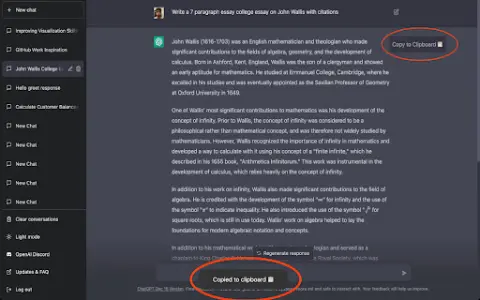
This extension allows you to copy the responses generated by ChatGPT by clicking a button or using the CMD+K shortcut key, and then have those responses checked by plagiarism detection tools.
How to use the Plagiarism Detector Extension for Chrome?
You can use this extension by clicking the copy button on ChatGPT’s response or by pressing CMD+K. The copied text will be automatically checked to determine whether it contains any plagiarized content.
The core functionality of the Plagiarism Detector Extension for Chrome.
One-click to copy the response from ChatGPT
Use the CMD+K shortcut key to copy.
Automatic plagiarism detection
Related
Pixu AI
Pixu.ai offers customizable AI-generated stock photos and illustrations.
myBrandgen.com
A platform that uses artificial intelligence to generate brand images and marketing content quickly and cost-effectively.
Fye.ai – Ai Rap Assistant
An AI platform designed to enable the quick and easy creation of rap songs, lyrics, and related content.
Mapify
Mind map generation tool
packback.co
An artificial intelligence-based learning platform designed to support discussion, writing activities, and teacher guidance.
profilepicturemaker.com
AI powered avatar generator with customization options.