AI TOOL / #07462
Vision AI
A Chrome extension that enables AI-driven insights based on screenshot data.
Introduction
Chrome extension for AI-powered insights from screenshots.
What is a Vision AI Chrome extension/plug-in?
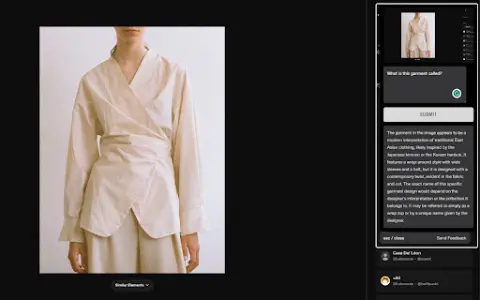
Visual AI is a Chrome extension that combines screenshot functionality with AI-driven insights to enhance online information search. It allows users to capture any portion of a web page, add notes or questions, and receive AI-generated responses based on the context of the captured image.
How to use the Vision AI Chrome extension/plug-in?
Install the Visual AI Chrome extension. Use CTRL + SHIFT + Y to take a screenshot, and then add any notes or questions you have. Visual AI will analyze the screenshot and provide an AI-generated response.
The core functions of the Vision AI Chrome extension/plugin
Screenshot capture
Interactive AI Suggestions
Seamless browser integration
Suitable for a wide range of applications in various fields
Privacy and Security
Related
CloverAI
An AI-based schedule management tool that incorporates features such as a calendar, analysis tools, a pomodoro timer, and gamified tasks.
AI On It
Intelligent email assistant – identifies events and tasks contained in emails to help you stay organized.
Morgen
A time management platform that integrates calendar, task, and scheduling features, and is equipped with AI-driven planning capabilities.
Agenda Hero for Chrome
A Chrome extension that allows users to create calendar entries from text with just one click.
Text-2-ICS
Automatically create calendar events based on text descriptions – saving you time and effort.
Torq AI
Chrome extension that delivers AI-powered Gmail replies and enhanced browsing productivity.