AI TOOL / #07222
ReadImage
Extract, edit, and copy text from images on web pages.
Introduction
Extracts, edits, and copies text from images on web pages.
What is Image Text Extractor ai chrome extension/plugin?
This extension allows users to extract text from images displayed on web pages. It supports common image formats such as jpg, jpeg, png and bmp. After extraction, the text can be edited and copied.
How to use Image Text Extractor ai chrome extension/plugin?
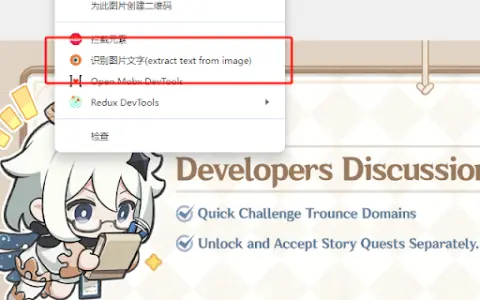
Hover your mouse over the image, right-click and select "Extract text from image". Press "Ctrl + Q" to view the extracted text on the extension page, where it can be edited and copied.
Image Text Extractor ai chrome extension/plugin core features
Extract text from images on web pages
Edit extracted text
Copy extracted text
Related
Receipt & Invoice Capture, Match, Categorize
Clyr automates the capture, matching, and categorization of receipts and invoices to simplify expense management.
Billy: AI Invoicing Made Effortless.
An AI-based invoicing tool designed for small businesses and freelancers, featuring integration with Stripe.
AI Accounting Apps
A platform that brings together AI accounting tools and automation solutions.
Mesh
An AI-powered accounting assistant designed for automatic bookkeeping and real-time financial analysis.
Digits — Accounting, reimagined.
An AI-powered accounting platform designed for startups and small businesses.
impact.com for Chrome
A Chrome extension designed to simplify the management of partnerships between publishers, creators, and brands.