AI TOOL / #06688
Vocha | Voice for ChatGPT
Vocha is a voice input extension specifically designed for ChatGPT, with an emphasis on privacy and ease of use.
Introduction
Vocha is a voice-typing extension for ChatGPT with a focus on privacy and ease of use.
What is the Vocha AI Chrome extension/plug-in?
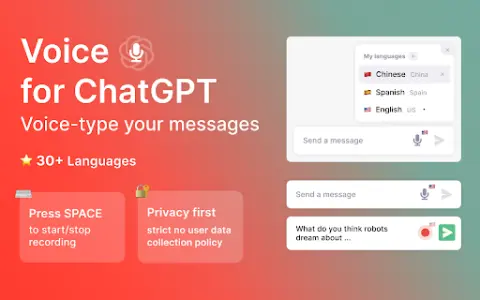
Vocha is a browser extension that allows users to input messages for ChatGPT via voice. It adds a microphone button to the message input field, which can be activated by using the SPACE key or by clicking on it. Vocha places great emphasis on user privacy, strictly adheres to policies that prohibit the collection of user data, and features a clean, minimalist design that ensures seamless integration with the ChatGPT interface.
How to use the Vocha AI Chrome extension/plug-in?
After installing the Vocha extension, a microphone button will appear in the ChatGPT message input box. You can press the SPACE shortcut key or click the microphone button to start and stop recording. You can change the language used for speech recognition by clicking on the flag icon. Remember to grant the microphone access permission during the installation process.
The core functions of the Vocha for Chrome extension/plugin
Provide voice input for messages sent via ChatGPT.
The SPACE shortcut key is used to start/stop recording.
Supports multiple languages (over 30 different languages).
Message editing options (send, edit, or continue recording)
Related
Xianyi AI Image Segmentation
Xianyi AI Image Segmentation Tool is a free, offline AI-based image segmentation tool. It is developed using the large-scale AI models Tauri 2 and RMBG-1.4, allowing for extremely fast segmentation – with speeds reaching the millisecond level. The image below is just a random beauty photo I found online; simply import it into the software, and it will automatically perform the segmentation for you. In fact, the background of this image…
Office Tool Plus
Office Tool Plus is a free and powerful tool for managing Office software installations. It eliminates the difficulties associated with downloading and installing Office applications and allows users to customize the installation process. Additionally, it comes equipped with various useful utilities related to Office.
Parallel translation of PDF documents using Lingban technology
Lingban AI is a browser extension developed using large-scale AI models. It enables your browser to function as an all-round AI assistant, offering features such as AI translation, conversations with AI, AI-assisted writing, AI-based reading and summarization of web pages and papers, information retrieval, note-taking, and drawing tools. With so many efficient capabilities at its disposal, browsing the internet becomes significantly more convenient and productive.
MacApp
The MacApp Sharing Channel is a website dedicated to providing downloads of cracked software for Apple Mac computers. This site requires no login and contains no advertisements; all resources are stored in cloud storage. The design of the website is very user-friendly—whether you need to download a particular software or search for a specific category, you can simply perform the relevant action. For example, if you’re looking for the commonly used Apple suite of programs…
AI inspiration PPT
"AI Inspiration PPT" is an online one-click PPT generation tool that integrates the latest AI office tools such as AI painting, AI dubbing, and AI writing. It can quickly generate PPT with clear structure and beautiful layout based on a brief topic description. One-click summary of 10,000-word documents into PPT, supporting free editing of content samples
Cracksurl
Cracksurl is a Russian software patch download site with a 12-year history, where you can download various software activation tools and patches. Unlike other cracked software sites, we still install software through normal channels, and after installation, on this