AI TOOL / #06173
Briefly: AI meeting summary & email follow up
Automatically generate meeting minutes, perform transcription, provide summaries, and carry out follow-up actions in a concise manner to enhance work efficiency.
Introduction
Briefly automates meeting notes, transcriptions, summaries, and follow-ups to enhance productivity.
What is the Briefly AI Chrome extension/plugin?
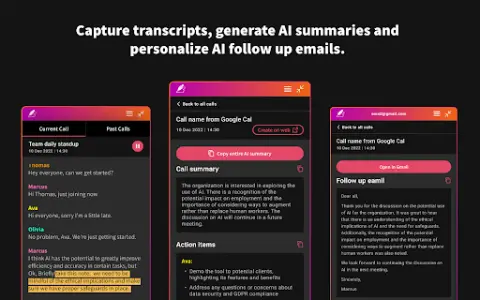
Briefly is a browser extension designed to capture meeting notes, transcribe conversations, summarize key points, and gather valuable insights without causing any disruptions. By automatically taking notes and providing tools to organize thoughts, it helps users stay focused during meetings. Briefly also simplifies the follow-up tasks after meetings by generating summaries, action items, and necessary emails. Moreover, it converts conversation contents into useful documents such as product requirements, market reports, or investment memorandums. It integrates with platforms like Slack, allowing users to update their CRM systems with meeting summaries and key insights.
How to use the Briefly AI Chrome extension/plug-in?
To use Briefly, please install the Chrome extension, log in using your Google account, start a Google Meet session, and then click “Start transcribing this meeting” within that call. After the call is over, open the Briefly extension to view the transcription and the AI-generated summary. Use the “Follow-up” tab to edit the content and send follow-up emails from your Gmail inbox. You can also access additional features by clicking the “Create on web” button or using the provided URL.
In brief, the core functions of the AI Chrome extension/plugin.
Meeting transcription and classification
Summaries and key insights generated by AI
Personalized action plans
Automated generation of subsequent emails
Generate project documentation from the transcription results.
Integration with platforms such as Slack
Related
wuko
wuko.ai: Use ChatGPT to query the content of web pages, and the results will be sent to your email address.
GPTPrompt
Chrome extensions designed for summarizing, explaining, generating content, and enhancing research efforts.
ReadPartner: AI Summaries of Webpages, Videos & Selections in Any Language
ReadPartner AI enhances the reading and video-watching experience by providing summary tools and productivity aids.
Skimming AI
Skimming.ai extracts knowledge from audio, video, and text on any website.
Summate – Summarize Any Website
An AI-powered browser extension that provides instant summaries of articles and videos.
Storywiz: AI Reading Assistant
Storywiz converts articles into visual stories and AI summaries for faster, more enjoyable reading.