AI TOOL / #06171
Patsa – AI-powered Meeting Copilot
A Chrome extension that enables real-time transcription and AI-powered Q&A during online meetings.
Introduction
Chrome extension for real-time transcription and AI-powered Q&A during online meetings.
What is the Patsa AI Chrome extension/plugin?
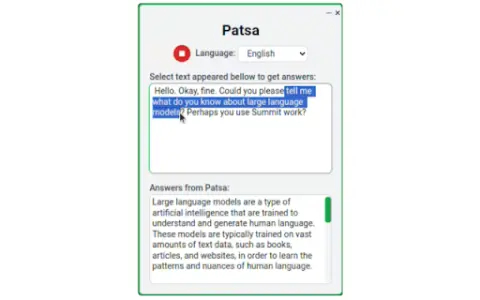
Patsa is a Chrome browser extension designed to enhance online meetings on platforms such as Google Meet, Zoom, and Teams. It transcribes other participants’ speech in real time and lets users select transcribed text to ask AI questions, providing instant information and answers.
How do I use the Patsa AI Chrome extension/plugin?
1) Launch the Patsa extension in any online meeting in Chrome. 2) Click the "Start Transcribing" button to transcribe what the other participants are saying. 3) Select the transcript text you want to ask the AI about, and you'll receive an instant response from the AI.
Core features of the Patsa AI Chrome extension/plugin
Real-time transcription of participants’ speech
AI Q&A based on transcribed text
Related
ChatGPT » Summarize everything!
A Chrome extension that uses ChatGPT to summarize web pages and YouTube videos.
Website Summarizer
A Chrome extension that uses the Gemini API to generate summaries of web pages and allows interaction with AI chatbots.
Page Summarizer (Using AI)
Browser extensions designed to use AI technologies (such as OpenAI or Transformers.js) to summarize the content of websites.
Nestornotes.com chrome extension
Chrome extension to save and organize web pages with AI-powered summarization and management.
Yoptio
An AI-powered RSS reader that offers clearer and more manageable ways to subscribe to news updates.
Text Explorer
AI-powered tools optimize the reading experience by highlighting relevant information and keywords.