AI TOOL / #04208
Shift-Ctrl-F: Semantic Search for the Browser
A Chrome extension that uses MobileBERT to search for and highlight answers on web pages.
Introduction
Chrome extension using MobileBERT to search and highlight answers on webpages.
What is the Shift-Ctrl-F Chrome extension/plugin?
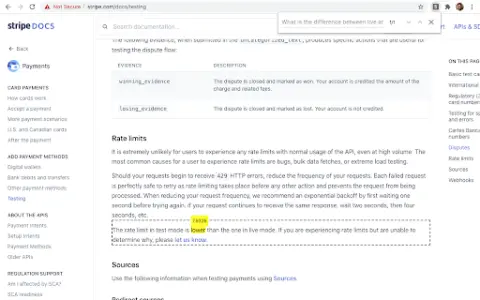
Shift-Ctrl-F is a Chrome extension that utilizes the MobileBERT model, which has been fine-tuned using the SQuAD dataset. This extension uses TensorFlowJS to search for answers on web pages and identify relevant elements. It allows users to enter natural-language queries and find corresponding answers within the content of the current page.
How to use the Shift-Ctrl-F Chrome extension/plugin?
1) Open the extension pop-up window using the toolbar or shortcut key (Shift-Ctrl-F).
2) Enter your natural language query in the search box.
3) Press Enter and wait for the model to return the results.
The core functionality of the Shift-Ctrl-F Chrome extension/plug-in.
Conduct natural language question-and-answer interactions on web pages.
Highlight relevant elements based on the search query.
Efficient processing using MobileBERT
Related
LikeLike
Find similar Instagram profiles based on the uploaded photos and locations.
HingeGPT
Generate mediocre Hinge pickup lines.
DePassport
An AI-powered platform designed to foster meaningful connections across various types of relationships.
DateReady
Games driven by artificial intelligence help improve dating skills through practice in real-life scenarios and immediate feedback.
Flirt Like Pro
AI-powered chat robots generate witty and intelligent responses, thereby enhancing one’s flirting skills.
Meet Millie
AI dating and relationship coach providing personalized advice and creative dating tools.